
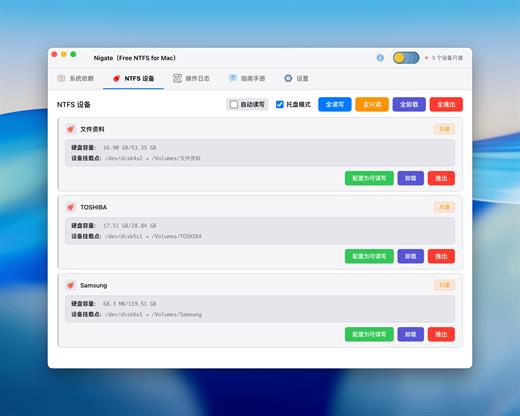
This is the Electron GUI version of Nigate, which provides a modern and intuitive interface for NTFS device management while retaining the original geek terminal version.
Features
- ? Modern Interface – Dark theme with clean and beautiful design
- ? Real-time Monitoring – Automatically detects NTFS device connections
- ✅ Dependency Check – Automatically checks and installs required system dependencies
- ? One-Click Mount – Easily mount read-only NTFS devices in read-write mode
- ? Status Display – Clearly displays device status and operation logs
- ?️ Secure & Reliable – Uses Electron security best practices
First Time Use
- Check System Dependencies
- After opening the application, click the “Check Dependencies” button
- The system will automatically check required dependencies (Swift, Homebrew, MacFUSE, ntfs-3g)
- If any dependencies are missing, click “Install Missing Dependencies” to install them
- Mount NTFS Devices
- Insert an NTFS-formatted removable storage device
- The application will automatically detect the device (refreshes every 5 seconds)
- For read-only devices, click the “Mount as Read-Write” button
- Enter administrator password to complete mounting
What’s New
Version 1.3.1:
- Release notes were unavailable when this listing was updated.
Compatibility
macOS 14.0 or later
Apple Silicon
Release Name: Nigate 1.3.1 – Free NTFS for Mac
Size: 96.5 MB
Links: HOMEPAGE – NFO – Torrent Search
Download: RAPiDGATOR
